View Article

Create and Configure the HTML Footer Correspondence Template

By Xelence Documentation posted 07-29-2024 02:34


Introduction

This allows you to create and configure HTML Footer which can be inserted in the main HTML Correspondence file later. Footer templates are useful for including information that you want to display on every page of correspondence, such as copyright informationTypically, the information entered in the footer appears grey in the main correspondence HTML file.

Prerequisites

Nothing is required.

Quick Steps
1 Click the Create New Item icon, then select New Page
2 Select the Page Type, then click Proceed
3 Enter the details, then click OK
4 Configure the Footer Template
5 Save the File

Detailed Steps

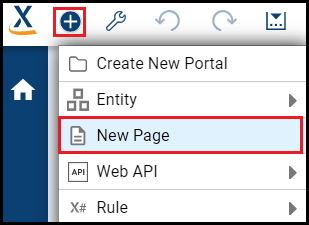
Step 1. Click the Create New Item icon, then select New Page.

This opens a drop-down list from which you can select an object. The item wizard creates a file.

Step 2. Select the Page Type
, then click Proceed.

This is the object you are creating. This example creates a HTML Footer Template.

Select the Page Type


Step 3. Enter the details, then click OK

Here, you can specify the Template name. It is the programmatic name of the footer template prefixed with ‘hcr’.
.

Enter Footer Template name


Step 4. Configure the Footer Template.

You can add Standard Bookmark or any other HTML control, as desired.
 
In this example, Copyright information is added to the footer.

You can add any special HTML character in the file using its equivalent HTML number code. 
Footer template is created
You can add the desired footer text in the Correspondence Footer section.
Add footer text
The Footer text gets added. The HTML number code is replaced by its equivalent HTML character.
footer text gets added


Step 5. Save the File

You are finished configuring the Footer Template file.


What are the improvements over S3 Version 6?

This is a new process.


Create a HTML Correspondence file

Create and Configure the HTML Header Correspondence Template


This post is part of the HTML Correspondence topic. Click here to open the HTML Correspondence Overview

#Xelence

#HTMLCorrespondence

#Communications

0 comments
67 views