View Article

Create a HTML Correspondence File

By Xelence Documentation posted 08-21-2024 10:15


Introduction

The purpose of the HTML Correspondence file is to map all the bookmarks in the template of the application data. This is how the application can populate the correspondence with targeted values. It is similar to doing a mail merge.

Previously, a Correspondence Template Record had to be created. Also, a Microsoft Word document was created with the same file name as the Template Code and it had to be saved at a pre-defined location. Now, with Xelence, the process is made simpler, and the HTML Correspondence Template record gets created automatically when you create the HTML Correspondence file. 

Prerequisites

  • The maintenance form you want to generate the correspondence from must already exist.
  • The entity must already exist.

Quick Steps
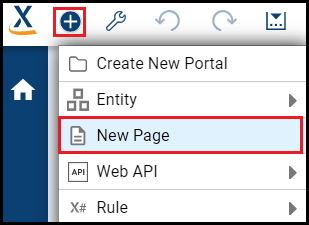
1 Click the Create New Item icon, then select New Page
2 Select the Page Type, then click Proceed
3 Select the template
4 Roll over the Form Layout, then click Choose


Detailed Steps

Step 1. Click the Create New Item icon.

This opens a drop-down list from which you can select an object. The item wizard creates a file.


Step 2. Select New Page.

Step 3. Select the Page Type
, then click Proceed.

This is the object you are creating. This example creates a HTML Correspondence file.

Select HTML Correspondence

Step 4. Enter the details, then click Finish.

The important properties are:

  • Correspondence Name(ID): Programmatic name of the correspondence file. The default prefix is 'hcr'.
  • Description: Plain text description of the file that users can use to identify it.
  • Entity Name: Name of the entity whose data the correspondence uses.
  • Portal Name: This is a starting point or gateway to other resources.
  • Select Folder: This is where Xelence will save the file. You can select an existing folder or create a new folder in the Solution Explorer.
  • Online Flag: If checked, it allows users to generate the correspondence through the application. It is checked by default.
  • Master Template: Base template for the correspondence, if required. 
  • Header Template: HTML Template whose header data the system adds in the top margin of the generated correspondence, if required.
  • Footer Template: HTML Template whose footer data the system adds in the bottom margin of the generated correspondence, if required.
  • Recipient Rule: Returns a collection of multiple recipients for whom the correspondence will be generated.
  • Associated Forms: Forms the user can generate the correspondence from.
The Associated Forms properties are:

Form Name: Specifies the form name the correspondence is generated from.
Form Entity: Specifies the entity associated with the form. It populates automatically.
Target Entity: Ad hoc form entity that is not the same as the entity on which the correspondence is based.

Enter the HTML Correspondence Form details

·       

Xelence creates HTML Correspondence file


What are the improvements over S3 Version 6?

This is a new process.


Related Articles

Create and Configure the HTML Header Correspondence Template

Create and Configure the HTML Footer Correspondence

This post is part of the HTML Correspondence topic. Click here to open the HTML Correspondence Overview

#Xelence

#HTMLCorrespondence

#Communications


0 comments
63 views